🧠
40nm Premium RSX Swap / Replacement
Our preferred Frankenstein RSX: factory bare-die 40nm silicon from select Super Slim MSX/MPX donors with a completely renewed die-level thermal interface.
View service details → iKon Technical SolutionsPS3 Hardware Restoration
PS3 Frankenstein Repair Service
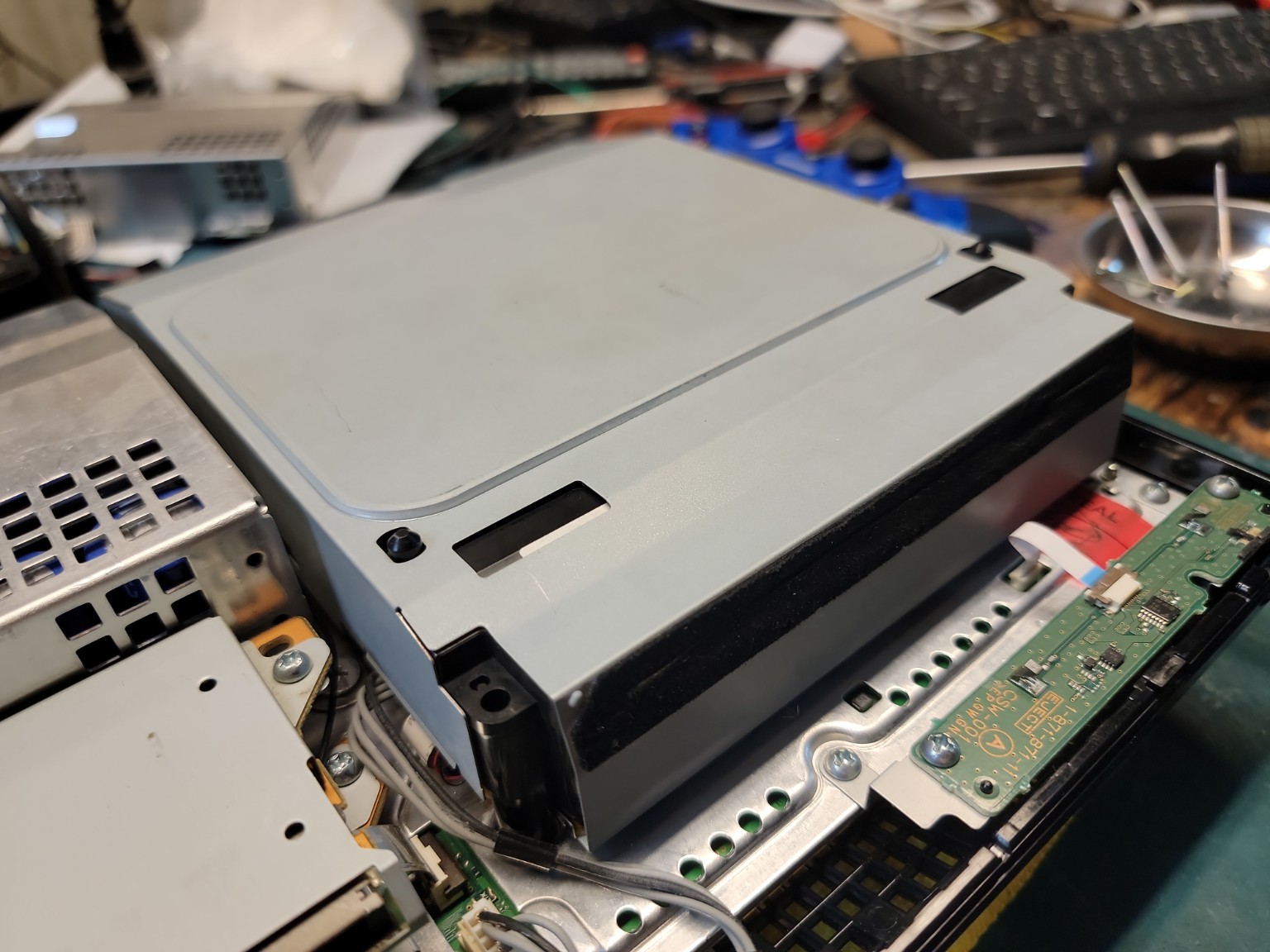
Professional FAT PS3 Blu-ray drive repair including KES-400A/KES-410A laser service, loading and spindle repair, ribbon cable diagnosis, paired drive-board testing, remarrying, and restoration of difficult backwards-compatible PS3 disc drives.
This is physical electronics repair only. This service does not include custom firmware, jailbreaks, modchips, copied games, downloaded games, piracy tools, firmware or system software modification, copyright bypassing, or instructions for accessing paid content.
Service Overview
The optical drive in an early PlayStation 3 is considerably more complicated than simply a laser and a spindle motor.
A complete FAT PS3 Blu-ray assembly includes the optical pickup, sled mechanism, spindle system, disc-loading mechanism, position sensors, ribbon cables, motor drivers, optical-control electronics and - on early systems - a dedicated Blu-ray logic daughterboard that is electronically paired to the console motherboard.
Because of that, "it doesn't read discs" does not automatically mean "replace the laser."
Our Blu-ray Drive Service is intended to diagnose the complete drive and repair the actual failure rather than replacing parts at random.
On a backwards-compatible FAT PlayStation 3, the optical drive may be responsible for reading several different types of media depending on the exact console model:
That makes the optical drive a particularly important part of a premium CECHA01, CECHB01 or CECHE01 restoration. A backwards-compatible PS3 that cannot reliably read its original physical media is only partially restored.
The earliest backwards-compatible systems use Blu-ray hardware that is now approaching twenty years old.
CECHA and CECHB systems commonly use the original BD-400 drive platform with:
These original KES-400A assemblies use an early single-lens optical design and are becoming increasingly difficult to source in known-good condition.
Later FAT PS3 revisions transitioned toward the BD-410 platform using the KEM-410ACA / KES-410A assembly.
The KES-410A is a dual-lens optical pickup with separate optical paths for:
That difference matters during diagnosis because the exact drive architecture installed in the console changes what a particular disc-reading symptom can tell us.
We normally test more than one disc type before condemning an optical pickup.
For example, a later dual-lens drive may:
On a dual-lens KES-410A system, that behavior can help isolate which optical path is failing.
The earlier KES-400A architecture is different, so we do not apply the same diagnostic assumptions to every FAT PS3 drive.
Drive model matters.
Optical pickups do not always fail as an immediate all-or-nothing event.
A weakening optical system can produce symptoms such as:
The laser diode, optical detector, focus/tracking system and physical condition of the lens all contribute to successful disc recognition.
Cleaning a dirty lens can occasionally restore normal operation, but cleaning cannot restore a laser diode that has lost optical output with age.
The optical pickup cannot read data correctly if the disc is not rotating at the speed and stability expected by the drive controller.
The spindle motor and its mechanical interface therefore form another important part of diagnosis.
A weak, sticking or inconsistent spindle system can create symptoms that resemble optical failure:
This is why simply seeing the laser illuminate does not prove that the laser is good, and seeing the disc spin does not prove that the drive is good.
The slot-loading mechanism in a FAT PS3 contains multiple moving components that have to remain synchronized.
The mechanism must:
A drive can therefore have a perfectly good optical pickup and still fail because the loading mechanism is mechanically out of time.
These failures require mechanical diagnosis rather than automatic laser replacement.
The drive controller needs to know where the mechanism is before it can safely operate it.
Early PS3 Blu-ray drives contain multiple switches and position-sensing circuits used to determine:
If one of those signals is incorrect, the drive can perform mechanically strange behavior even when every motor is still capable of moving.
Mechanical motion without correct position feedback is not a functioning drive.
A FAT PS3 optical drive contains several flexible flat cables carrying high-density electrical connections between the motherboard, Blu-ray controller, optical pickup, sensors and mechanical assemblies.
After nearly twenty years - and sometimes several previous repair attempts - these cables can become:
A damaged ribbon can mimic a failed laser, bad motor or dead logic board depending on which signals are interrupted.
We inspect the cables and connector condition before automatically condemning the expensive hardware.
Early FAT PS3 drives contain a dedicated Blu-ray daughterboard carrying substantial drive-control electronics.
For example, the original BMD-001 board found in many launch-model systems contains:
This means a complete drive is both a mechanical assembly and an electronic subsystem.
On applicable FAT PlayStation 3 systems, the Blu-ray drive daughterboard is cryptographically paired - commonly referred to as "married" - to the console motherboard.
This means we cannot treat the complete drive assembly like an ordinary PC DVD drive and simply install any physically compatible replacement.
The original paired daughterboard is extremely valuable and should be preserved whenever possible.
If the original paired drive daughterboard remains functional, we can normally repair the mechanical portion of the drive while keeping the motherboard pairing intact.
Depending on the failure, this can include replacing:
The paired electronics remain with the original console.
This is normally our preferred repair path.
If you are sending us a console that has been previously repaired, send every original Blu-ray component you still have.
Even if the drive appears completely dead, the original daughterboard may contain the pairing information we need to preserve.
A physically destroyed loading mechanism can be replaced.
A dead laser can be replaced.
A damaged spindle can be replaced.
But a missing original paired logic board can turn an otherwise straightforward drive restoration into a significantly more involved firmware and security repair.
We see this occasionally on previously repaired consoles.
A customer buys another Blu-ray drive that physically fits, plugs it into the console and discovers that the replacement still does not operate correctly.
That does not necessarily mean the replacement drive is bad.
The replacement daughterboard may simply not be married to that motherboard.
A mechanically compatible drive and an electronically paired drive are two different things.
When the original drive controller is missing, electrically damaged beyond repair, or has already been replaced with a mismatched board, Blu-ray drive remarriage may be required.
Remarrying establishes the required relationship between a replacement Blu-ray controller and the PS3 motherboard.
This is not part of an ordinary laser replacement.
Depending on the console's firmware state and previous modification history, remarrying can require additional service-level procedures and system configuration before the replacement drive electronics will operate correctly.
Because of this, missing or mismatched Blu-ray logic hardware is quoted separately after evaluation.
The PlayStation 3 contains a Factory / Service Mode originally intended for manufacturing and service operations.
Among its documented functions are:
This makes some drive failures repairable even after the original daughterboard has been lost or replaced, provided the remaining motherboard, firmware and replacement hardware allow the required service procedure.
Drive remarriage is not always the end of the restoration process.
The PS3 also uses Blu-ray playback data associated with protected commercial movie playback.
After certain remarry or firmware-recovery operations, DRL-related data may also need to be restored or verified before commercial Blu-ray movie playback is considered completely repaired.
This is one reason we do not consider a drive repaired merely because it can launch one PS3 game disc.
When the hardware and console model support them, final optical-drive qualification can include testing with several media formats.
Depending on the system, we may test:
A drive passing one disc format does not automatically prove every optical path and drive function is healthy.
For example, "reads DVD" is not the same test as "reads Blu-ray."
The CECHA01 and CECHB01 are among the most desirable PS3 systems because of their extensive backwards compatibility and launch-era hardware.
Unfortunately, their original BD-400 / KES-400A optical hardware is also among the oldest drive hardware in the PS3 family.
As surviving original parts become scarcer, restoration increasingly becomes a question of preserving usable original components and maintaining an inventory of compatible replacement assemblies.
We therefore try to retain and repair the original drive architecture whenever practical rather than treating an early backwards-compatible drive as disposable.
Our preferred order of repair is:
We would rather preserve the original architecture when reliable replacement parts are available.
Original KES-400A / KEM-400AAA hardware will not remain plentiful forever.
If the required launch-model optical hardware becomes unavailable, prohibitively expensive, or impossible to qualify reliably, a compatible later dual-lens drive configuration may be considered as a restoration option.
A later dual-lens system can provide a more modern optical architecture with separate CD/DVD and Blu-ray optical paths.
However, this is not a plug-and-play laser swap.
Depending on the console and hardware combination, a complete conversion can involve:
For this reason, a later-drive conversion is considered separate custom restoration work and is quoted after inspection.
Newer does not automatically mean electrically or mechanically interchangeable.
Sony revised the PS3 optical system repeatedly during production.
Across the PS3 family there are multiple drive generations, including:
Different generations can use different:
Part number and console revision matter.
We identify the actual drive configuration before ordering or installing replacement hardware.
The listed $140 price represents a typical Blu-ray drive service during a restoration.
The actual cost can vary significantly depending on what the drive needs.
A simple ribbon, sensor, loading or mechanical correction can be less expensive than a complete optical replacement.
A repair requiring a scarce KES-400A, complete KEM-400AAA sled, donor mechanical assembly, replacement daughterboard or custom remarry procedure may cost more.
Original launch-model optical parts are increasingly difficult to source in trustworthy condition, so part availability can affect both price and turnaround time.
If the required part makes the repair materially more expensive than the listed service price, we provide an updated quote before proceeding.
At this age, simply obtaining a replacement optical pickup does not guarantee a successful repair.
Some available units are old inventory. Others have unknown storage histories or may have already been handled during previous repairs.
For that reason, installation is followed by actual read testing.
The repair is not approved simply because a replacement laser emits light or moves through its focus routine.
It has to read discs reliably.
A complete Blu-ray evaluation can include:
We do not replace the laser simply because the console cannot read a disc.
We do not replace the entire drive simply because a spindle motor failed.
We do not discard the original paired daughterboard simply because the mechanical assembly is damaged.
And we do not assume a replacement drive that plugs into the motherboard is automatically compatible.
The goal is to identify the failed layer of the drive and preserve as much correct original hardware as practical.
A backwards-compatible FAT PS3 receiving an extensive Frankenstein conversion is often being restored specifically because the customer intends to keep the console long term.
It makes little sense to spend heavily rebuilding the motherboard while ignoring obvious problems in the optical drive.
If the drive already:
the restoration is an excellent opportunity to address it.
A backwards-compatible launch PS3 occupies a unique position because one console can provide access to physical games from multiple PlayStation generations.
For collectors who own original discs, that optical capability is part of what makes the machine valuable.
A CECHA01 with a premium Frankenstein RSX but a dead Blu-ray drive is still missing an important part of the original experience.
Our objective is therefore not merely to make the motherboard survive.
For customers who want it, we want the restored console to remain capable of doing what the hardware was originally designed to do - including reading its physical media.
A Blu-ray drive is not just a laser.
It is an optical, mechanical, electrical and - on early PS3 systems - cryptographically paired subsystem.
We diagnose the complete assembly before deciding what needs to be replaced.
If the original paired daughterboard is healthy, we preserve it whenever possible.
If the original optical or mechanical hardware can be repaired, that is our preferred path.
If scarce launch-model parts make the original configuration impractical, we can evaluate compatible later hardware and the additional remarry work required to properly integrate it.
The objective is not simply to make one disc appear in the XMB. The objective is to return the optical system to reliable operation across the media formats the particular PS3 was designed to support.
Premium Packages Customized to your budget.
Related Service Options
Most premium restorations combine multiple hardware services depending
on the condition of the console.